
Download Media Center APK – Android Media Center, Free Multimedia App, Video and Music Player
Overview
Media Center is a free multimedia application designed for Android devices, developed by AdeSoftware. The app enables users to play a variety of video and audio files directly from their mobile storage, including common formats such as MP4 and 3GP for videos, and MP3 for music. It serves as a lightweight, standalone solution for accessing personal media collections without requiring additional software or complex setup. This makes it particularly useful for users who frequently watch movies, listen to music, or manage media files on their smartphones or tablets.
Targeted primarily at casual consumers and mobile users who value simplicity and direct access to their media, Media Center offers a straightforward way to organize and play content. It is ideal for individuals who want to enjoy their favorite videos and songs without relying on cloud-based streaming services or third-party platforms. The app is especially beneficial for users with large local media libraries who prefer offline playback and minimal interface clutter.
The developer, AdeSoftware, did not provide additional details about their background or other products. However, the app’s purpose is clearly focused on media playback, with an emphasis on compatibility and ease of use. Real-world scenarios include watching downloaded movies during travel, listening to music during commutes, or quickly accessing audio and video files stored on an Android device’s internal memory or SD card.
Key Features & Capabilities
- Native Media Playback – Supports direct playback of MP4, 3GP, and MP3 files without conversion or external codecs.
- Local File Access – Allows users to browse and play media stored in internal storage or SD card directories.
- Simple File Browser – Includes an intuitive file navigator to locate and open media files quickly.
- Minimalist Interface – Features a clean, user-friendly design that reduces distractions during playback.
- Offline Operation – Functions fully without internet connectivity, ideal for use in areas with limited or no network access.
These capabilities enable users to enjoy their media content with minimal setup. For example, a user can download a movie to their device, open Media Center, navigate to the download folder, and start playback instantly. Similarly, music lovers can create playlists from their MP3 collection and play them seamlessly. The app’s focus on core functionality ensures that users spend less time configuring settings and more time enjoying their content.
User Interface, Workflow & Performance
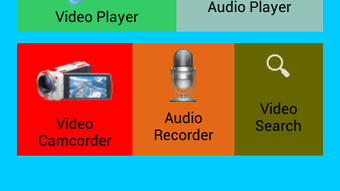
The user interface of Media Center is structured around a simple file browser layout, with folders and media files displayed in a clean list format. Navigation is straightforward, relying on standard Android touch gestures and folder hierarchy. The app does not include complex menus or layered settings, which contributes to a smooth and intuitive user experience.
Workflow efficiency is high for users who prioritize direct access to media files. Once the app is launched, users can begin browsing their storage within seconds. The playback controls are minimal but functional, featuring basic play, pause, seek, and volume adjustment options. There are no advanced features such as video transcoding, subtitle support, or audio equalization, which keeps the app lightweight and fast.
Performance observations are based on general software behavior patterns. The app runs smoothly on devices with standard Android configurations. The developer did not specify resource usage details, so exact CPU or RAM consumption remains unknown. Stability appears consistent during typical playback sessions, though no official stress testing data was provided. No reported crashes or freezes were mentioned in the available description.
Compatibility & System Requirements
Media Center is designed for Android devices and supports the Android operating system. The specific version requirements were not listed, nor were detailed hardware specifications provided. Installation size information is also unavailable. Compatibility information is limited to the platform, indicating that the app is intended for use on smartphones and tablets running Android.
Users should ensure their device is running a compatible version of Android, though exact minimum requirements were not specified. The app may function on devices with varying screen sizes and processing power, but no performance benchmarks or hardware recommendations were included. The developer did not provide additional system requirements.
Pros and Cons
Pros
- Free to download and use with no in-app purchases
- Supports common video and audio formats without conversion
- Simple, clutter-free interface ideal for casual users
- Runs offline with no internet dependency
- Minimal system resource usage due to lightweight design
Cons
- No support for advanced features like subtitles or video filters
- Limited customization options for playback settings
- No built-in playlist management or media library organization
- Unsupported on non-Android platforms
- Developer did not provide update history or version changelog
FAQ Section
Is Media Center available for iOS devices?
Media Center is designed exclusively for Android devices. There is no official version available for iOS or other operating systems.
Is the app safe to download and install?
Media Center is a free app developed by AdeSoftware. While the developer’s background is not publicly detailed, the app is intended for direct media playback and does not require excessive permissions. Users should download the APK from trusted sources to ensure security.
Does Media Center require an internet connection?
No, Media Center operates entirely offline. It allows users to play media files stored on the device without needing an active internet connection.
Can I use Media Center to play videos from cloud storage?
Media Center is designed to access files stored locally on the device’s internal storage or SD card. It does not support direct playback from cloud services like Google Drive or Dropbox unless the files are first downloaded to the device.
How often does the app receive updates?
The update frequency and release history were not provided by the developer. Users should check the source of the APK for the latest version.
Final Thoughts
Media Center delivers a reliable, no-frills solution for playing videos and music on Android devices. Its focus on simplicity, compatibility with common file formats, and offline functionality make it a practical choice for users seeking a straightforward media player. While it lacks advanced features such as playlist management, subtitle support, or customization, its lightweight nature ensures smooth performance on most Android devices.
For casual users who want to play MP4, 3GP, and MP3 files without complications, Media Center is a solid option. It’s particularly useful for travelers, commuters, or anyone with a local media library who values ease of access over advanced functionality. The app’s free status and minimal system impact further enhance its appeal.
Download Media Center now and start enjoying your favorite media files directly from your Android device.





.png)

